Your first bake
argus-atlas 0.3.2.dev6+g77cc8fd @ 77cc8fdPyPI (opens in new tab)Source (opens in new tab)Changelog (opens in new tab)
Imported from docs/your-first-bake.md on argus-atlas's dev branch at that commit. Fixes go upstream, not here.
A walk-through for the first real bake on a GPU host running ComfyUI, from an empty model tree to a draped map. It runs every atlas command from the image with docker compose, so the host needs Docker but not GDAL. The host-side paths come from your .env (see .env.example (opens in new tab)):
What a bake looks like once it works, and which knobs matter, is in styles.md.
What ComfyUI needs
-
ComfyUI reachable from the atlas container: on the same host, the default
COMFYUI_BASE_URL=http://host.docker.internal:8188works (compose adds the host-gateway alias); on another machine,http://<GPU_HOST>:8188with ComfyUI started with--listen.docker compose run --rm atlas doctorreports whether it answers. -
An SDXL checkpoint. The bakes in the README use Juggernaut XL (
sdxl/juggernautXL_ragnarokBy/juggernautXL_ragnarokBy.safetensors). Names are given exactly as ComfyUI lists them, relative tocheckpoints/orloras/. -
A depth-capable SDXL ControlNet. Recommended: xinsir's controlnet-union SDXL, promax variant (~2.5 GB, depth, canny and tile in one):
mkdir -p "$ATLAS_MODELS_HOST/controlnet/controlnet-union-sdxl"
curl -L -o "$ATLAS_MODELS_HOST/controlnet/controlnet-union-sdxl/diffusion_pytorch_model_promax.safetensors" \
  https://huggingface.co/xinsir/controlnet-union-sdxl-1.0/resolve/main/diffusion_pytorch_model_promax.safetensors
ComfyUI lists it as
controlnet-union-sdxl/diffusion_pytorch_model_promax.safetensorswithout a restart. A lighter alternative isdiffusers/controlnet-depth-sdxl-1.0(~1.2 GB). -
No LoRA is needed for a first bake: use the
_noloratemplates.
atlas pins the checkpoint and LoRA by SHA256, so $ATLAS_MODELS_HOST must be the same tree ComfyUI loads them from. The resolver takes one root. If ComfyUI merges several trees (extra_model_paths.yaml), point atlas at the one that holds the checkpoint you name, and keep LoRAs in that same tree.
Point a template at your ControlNet
The packaged templates name a placeholder ControlNet, diffusers_xl_depth_full.safetensors. ComfyUI rejects it with value_not_in_list unless you have that file, so render a copy and edit its ControlNetLoader node:
for t in EXAMPLE_TEMPLATE_COMPOSITE EXAMPLE_TEMPLATE_SEAM_NOLORA; do
  docker compose run --rm atlas python -c \
    "import argus_atlas.backends.workflow as w, json; print(json.dumps(w.example_template(w.$t), indent=2))"
done
Save the first output as $ATLAS_RECIPES_HOST/atlas-composite.json and the second as $ATLAS_RECIPES_HOST/atlas-seam-nolora.json, then in both:
sed -i 's|diffusers_xl_depth_full.safetensors|controlnet-union-sdxl/diffusion_pytorch_model_promax.safetensors|' \
  "$ATLAS_RECIPES_HOST"/atlas-*.json
strength (0.65) and end_percent (0.8) in that node are the ControlNet knobs; they live in the template on purpose. bake uses --workflow (or ATLAS_WORKFLOW); chunk and chunks ignore both and use the recipe's workflow, a path relative to the recipe file, so set "workflow": "atlas-seam-nolora.json" in your copy of examples/recipes/antique.json.
One canvas, end to end
cp .env.example .env            # UID/GID, the *_HOST paths, COMFYUI_BASE_URL
docker compose build
docker compose run --rm atlas doctor

BBOX=10.55,45.40,10.95,45.90    # Lake Garda: strong relief and a shoreline, so "it lines up" is visible
docker compose run --rm atlas dem --bbox $BBOX --out /data/dem/garda.tif
docker compose run --rm atlas osm --bbox $BBOX --zoom 11 --layers water,rivers,roads,forest,urban --out /data/dem/osm/garda
docker compose run --rm atlas controls --dem /data/dem/garda.tif --bbox $BBOX --out /data/out/atlas/garda \
  --layer water=/data/dem/osm/garda/water.geojson --layer rivers=/data/dem/osm/garda/rivers.geojson \
  --layer roads=/data/dem/osm/garda/roads.geojson --layer forest=/data/dem/osm/garda/forest.geojson \
  --layer urban=/data/dem/osm/garda/urban.geojson
# Open $ATLAS_JOBS_HOST/garda/hillshade.png and composite.png before spending a bake.

docker compose run --rm -e ATLAS_ALLOW_BAKE=1 atlas bake /data/out/atlas/garda \
  --preset antique --seed 7 \
  --checkpoint sdxl/juggernautXL_ragnarokBy/juggernautXL_ragnarokBy.safetensors \
  --models-dir /data/models --workflow /data/recipes/atlas-composite.json
docker compose run --rm atlas tiles /data/out/atlas/garda
docker compose run --rm atlas inspect /data/out/atlas/garda
For a coast, add --sea-level 0 to controls: OSM has no ocean polygons, and GLO-30 puts the sea at 0 m, so the sea mask comes from the DEM. A variant bake that keeps the controls: bake ... --out /data/out/atlas/garda-s9 --seed 9.
Check it
-
fantasy.tifexists andinspectshowsaligned=Truewith the checkpoint SHA256. If the gate failed, there is afantasy.pngand no GeoTIFF; see the README's When it fails. -
Drape it:
docker compose up -d servewithATLAS_CORS_ORIGINS='*', serveexamples/with any static server (python3 -m http.server 8106 --directory examples), and openviewer.html?server=http://<host>:8105&job=garda. Slide the opacity: coastline and ridges must line up with the basemap.flow.html?server=...runs the whole flow from the browser when the server hasATLAS_ALLOW_BAKE=1andATLAS_ALLOW_OSM=1, with$ATLAS_DEM_HOSTwritable (POST /osmwrites under/data/dem/osm/).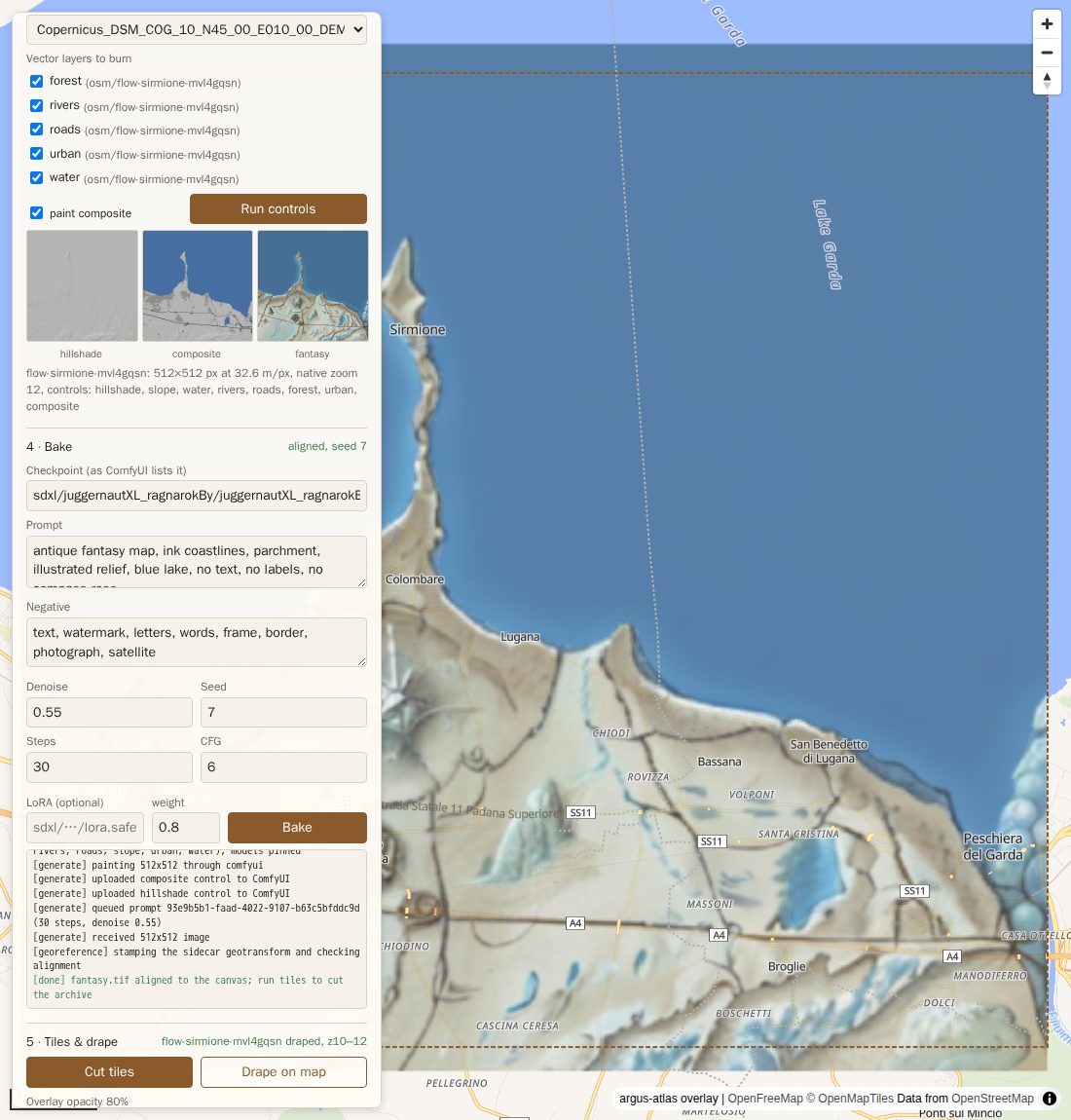
-
Every output carries its request:
exiftool fantasy.png(ImageDescription),gdalinfo fantasy.tif(TIFFTAG_IMAGEDESCRIPTION), and theargus_bakekey in the PMTiles metadata.
Chunks
Once one canvas looks right, grow a region from a recipe:
docker compose run --rm -e ATLAS_ALLOW_BAKE=1 atlas chunks \
  --tile 10/1009/640 --rings 1 --recipe antique --sea-level 0 --allow-missing \
  --land /data/dem/land.gpkg --out /data/out/atlas/antique
docker compose run --rm atlas mosaic /data/out/atlas/antique --out /data/out/atlas/antique.pmtiles
The block's DEM and OSM layers are fetched once into <out>/.block; --land (any land polygon file, e.g. Natural Earth 10m land) only skips chunks with no land in their tile. --plan prints the chunks and their seam order without baking; --controls-only stops before the GPU. A re-run skips finished chunks, so it resumes after a failure. See the README's Chunks and style recipes.
Operational notes
- The first bake is slow, later ones are not. Expect several minutes on the queue for the first bake while ComfyUI loads the checkpoint and the ControlNet from a cold page cache; the 30 sampling steps themselves take seconds on a 24 GB card. With ComfyUI warm, a canvas bake plus tiles takes 20–45 s, and a 1024 px chunk 45–55 s.
- If ComfyUI restarts mid-bake (an idle watcher, an OOM), the queued prompt disappears; the backend notices it is in neither
/queuenor/historyand fails instead of waiting out the timeout. Re-run the bake. - Don't rely on ComfyUI's output directory. atlas copies the painted PNG into the job dir; that copy is the one that is stamped and gated.
- Run the containers as your uid (compose does, from
UID/GID), or job dirs end up owned by root. - Checkpoint verification re-hashes the model in each container, a few seconds per bake for a 6–7 GB checkpoint.
A cartography LoRA
No public cartography LoRA is on Hugging Face; Civitai has several SDXL ones ("Fantasy Map", "LargeFantasyCityMap", "OgMapTerrainPatch"). scripts/fetch_civitai_lora.py (opens in new tab) lists and downloads them with a .civitai.json sidecar (ids, base model, trigger words, licence flags):
python3 -I scripts/fetch_civitai_lora.py --list 382959
CIVITAI_TOKEN=... python3 -I scripts/fetch_civitai_lora.py --out ./models 382959
rsync -av ./models/loras/ <GPU_HOST>:"$ATLAS_MODELS_HOST"/loras/
Bake with the LoRA template (EXAMPLE_TEMPLATE, patched as above), --lora <name> --lora-weight 0.5, and the LoRA's trigger word in --prompt. At 0.8 the Fantasy Map LoRA starts to fight the ControlNet (shorelines soften); 0.5 keeps its style with crisp geometry.